- 檔案名稱 OpenedFilesView 1.70.rar
- 相關網址 http://portable.easylife.tw/1363
- 來源網址 http://9ez.me
- 分享網址
-
- 檔案標籤 ► OpenedFilesView
- 檔案下載
-
- 相關網址 http://portable.easylife.tw/1363
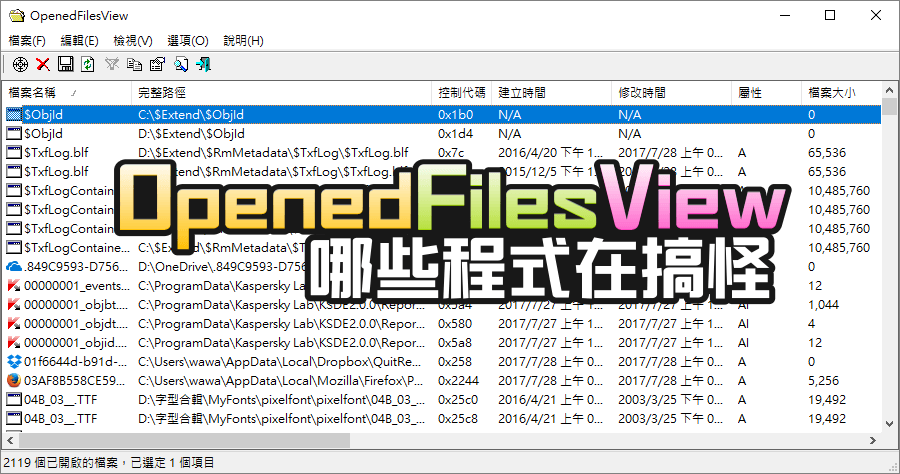
系統中的被開啟的檔案很多,使用 OpenedFilesView 可以窺探到更多的細節,像前陣子我電腦的 TEMP 目錄一直爆掉,一直有跑出新的快取檔案,很快的硬碟空間就只剩下 0%,要抓出元兇就很適合使用 OpenedFilesView 這樣的工具,查看有開啟 TEMP 路徑的程式,發現原來是服毒軟體搞的鬼,還真的不知道是怎麼了,重開機就解決了~哈!
使用方式基本上超級簡單,開啟軟體列表就會呈現在系統運作中被開啟的檔案,檔案名稱的前方會有小小的圖示,很快就可以識別出是什麼應用程式所執行,或是拉到後方查看進程路徑,如果是檔案無法刪除的話,也可以藉此查看,或是使用 Unlocker 的軟體來解除檔案鎖定,也能快速的刪除無法刪除的檔案唷!
http://www.nirsoft.net/utils/opened_files_view.html
32bit 免安裝版:
OpenedFilesView 1.70.rar(MediaFire下載)
OpenedFilesView 1.70.rar(Rapidgator下載)
OpenedFilesView 1.70.rar(ZippyShare下載)
OpenedFilesView 1.70.rar(YunFile下載)
OpenedFilesView 1.70.rar(本站下載)
檔案大小:69 KB
64bit 免安裝版:
OpenedFilesView 1.70 x64.rar(YunFile下載)
OpenedFilesView 1.70 x64.rar(ZippyShare下載)
OpenedFilesView 1.70 x64.rar(Rapidgator下載)
OpenedFilesView 1.70 x64.rar(MediaFire下載)
OpenedFilesView 1.70 x64.rar(本站下載)
檔案大小:81 KB
- ■ [today_top.title;block=li;ondata=m_event_a1] [today_top.url;htmlconv=no]
- ■ [yesterday_top.title;block=li;ondata=m_event_a1] [yesterday_top.url;htmlconv=no]
- ■ [week_top.title;block=li;ondata=m_event_a1] [week_top.url;htmlconv=no]
- ■ [random.title;block=li;ondata=m_event_a1] [random.url;htmlconv=no]

