- 檔案名稱 CreateShortcutThere 1.1.rar
- 相關網址 http://portable.easylife.tw/2851
- 來源網址 http://9ez.me
- 分享網址
-
- 檔案標籤 ► CreateShortcutThere
- 檔案下載
-
- 相關網址 http://portable.easylife.tw/2851
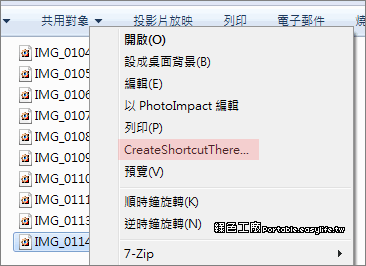
建立檔案捷徑的動作很簡單,預設右鍵建立檔案捷徑是產生在同一個目錄,之後再將捷徑移到其他地方,以上兩個步驟若可以合而為一可以更佳的方便,【CreateShortcutThere】就提供了這樣的功能,檔案點選右鍵之後選擇「CreateShortcutThere」,接下來就是選擇存放目的地的視窗,雖然說速度上沒有塊上非常非常多,但是節省了複製貼上的麻煩,小小工具其實也算很便利。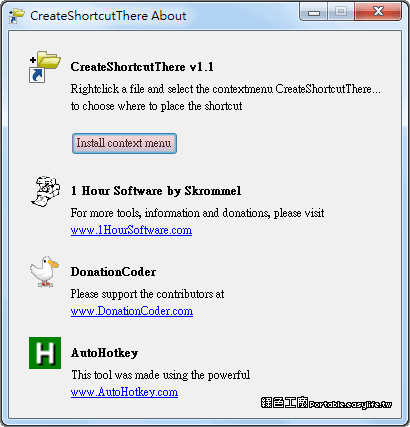
此軟體算是免安裝的類型,執行之後點選「Install context menu」,就會將這樣的功能與系統右鍵結合,軟體關閉也不會影響,我覺得大家就不妨讓右鍵選單增加這樣的功能,若是真的不喜歡可以再透過此工具移除。
http://www.donationcoder.com/Software/Skrommel/index.html#CreateShourtcutThere
CreateShortcutThere 1.1.rar(Megaupload下載)
CreateShortcutThere 1.1.rar(Hotfile下載)
CreateShortcutThere 1.1.rar(FileSonic下載)
CreateShortcutThere 1.1.rar(Uploading下載)
CreateShortcutThere 1.1.rar(DepositFiles下載)
CreateShortcutThere 1.1.rar(本站下載)
檔案大小:201 KB
- ■ [today_top.title;block=li;ondata=m_event_a1] [today_top.url;htmlconv=no]
- ■ [yesterday_top.title;block=li;ondata=m_event_a1] [yesterday_top.url;htmlconv=no]
- ■ [week_top.title;block=li;ondata=m_event_a1] [week_top.url;htmlconv=no]
- ■ [random.title;block=li;ondata=m_event_a1] [random.url;htmlconv=no]

